Well, odds are you’ve noticed that Edublogs has just undergone a pretty radical upgrade – and that your admin area is looking a heap of a lot different!
In particular you’ll notice that the admin menu now goes down the side – rather than the top, and that everything has gone all drag ‘n drop pretty, but that’s not the all of it.
There’s also vastly improved uploading / media management, far better management tools for posts, pages, links, tags, categories and almost everything that can be managed!
And there are some plain excellent new features, like QuickPress – now featuring in your dashboard:
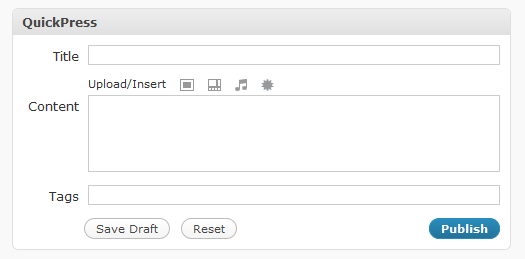
If you and your students need some assistance we’ve also been working like dogs to get the new Help & Support section up to date… it’s pretty much there but we’ll be adding new stuff to it as we go into the 2009 – 2010 academic year.
In particular you might like to share around our guide for Getting Started with Edublogs – it also comes with handy downloadable pdfs!
If you;re looking for someone to thank for them (or to complain about to if you hate them ;) the you’ll want to catch up with Sue Waters aka The Edublogger.
But that’s not all there is!
This year we’re going to be adding amazing new features, themes and plugins to Edublogs.org blogs and Edublogs Campus so now is the time to let us know of any extra features that you’d like to see.
As well as any bugs you might encounter with the new upgrade… but we’re hoping there are very few of them :)
Here’s to a great Edubloggin’ 2009 – 2010!



140 responses so far ↓
Looks fine, with all tools visible down the side. HOWEVER, one thing I don’t see is a list of all my 60 student blogs. It used to be on the Dashboard, as a drop down menu called “All My Blogs.” I could quickly see what was happening on each student’s blog. How does that work now?
Thanks,
V
vhinkle.edublogs.org
hinkle@baymoon.com
Glad you like it :)
If you click on ‘Dashboard’ and then ‘My Blogs’ you should see them all.
Does that work ok for you?
I actually do not like the new page. I found the old one a lot easier to use and some features seemed to have gone missing. For example, there used to be a part where you could password a post for security reasons. I would often out students photos on the blog and password it for their own security. Now i can’t seem to find it… can anyone help me with this??? would be great if you could thanks. The old one was set out easier especially for those new to the site, thinsg were easier to find.
Sorry that you’re not that keen on it overall – I can promise that it gets easier over time and you’ll find a lot of things work better now… but it can take some time.
To password protect a post click on ‘Edit’ next to ‘Visibility: Public’ (in the publish box) and apply a password if you want.
You can now also stick the post to the top of the front page or make it private (so only you and other administrators can see it) – a couple of really neat new features :)
I’d like to see the SAVE button more prominent – took quite a while to find. Also the EDIT page started a long way down the screen.
Other wise not bad.
Confused! As a free Edublogs user how do I add new users to my blog roll?
You’ll be happy to know that your posts and pages are auto saved almost every minute in case you miss it :)
@colinwilson you can add new Links to your blogroll using your Links menu and new users to your blog via your users menu.
Ouch! I just inservied my teachers on this blog site on Tuesday afternoon and they went away so inspired – now I’ve got them all knocking on my door trying to figure it all out again. Bad timing for me but I think it will be fine in the long run. We’ll get there – teachers have to be flexible right?
Just had a quick look at the section “My blogs” With about 200 that I am co-administrator on, there seems to be a waste of space when the name of the blog and visit/dashboard appear for each blog. Maybe all my blogs could be listed in two or three columns instead of one??
Lessons with students tomorrow, so hopefully more questions then.
ITs great cause now i can post up my blogs faster instead of waiting 30seconds when the post page is on the laft of my dashboard.
Its awsome
JK
James, I think the upgrade may have introduced some issues with my mseyfang.edublogs.org. Sometimes it fails to load in a browser and ScribeFire no longer works. Wrote a little post with some detail and screenshots at:
http://mseyfang.edublogs.org/2009/07/30/scribefire-and-edublogs-org-not-talking-after-upgrade/
Hope this helps to track down any issue.
Mike
p.s. Cannot seem to add a post to the forums, no matter how many times I login. HEEEELP.
Mike
@mrslass I did try to warn all users. On my post Introducing The Campus and Other Important News!” on July 21 I said “Edublogs will be upgraded to WordPress MU 2.8.2 within the next few weeks.”
Keep an eye on the Getting Started with Edublogs material which you can download for them if they like.
@Miss W I will discuss with James and see what can be done.
@JK I agree is runs so much faster and images are so much easier to upload. Glad you are liking.
@Mike Thanks re-forum. We are aware on the issue and are working on it.
We had to turn off XMLRPC temporarily for stability and security issues. This is probably why you are having these issues with ScribeFire. It should be switched back on within 2 weeks.
Hi
Yes, I think I like the new look. I seem to be finding things OK.
When I am writing a new post the post box is covered up with the publish box and I’m typing without seeing what I’m doing. I’m sure its just a early stages hiccup that will be sorted out soon.
Thanks for your hard work.
@mwh1 Thanks for your feedback. When I log into your blog dashboard and look are your New Post Screen it is all looking fine. Can you give us some more details so we can check it out? Can you tell us what web browser you are using (e.g. Internet Explorer, FireFox or Flock), what is the size of your monitor and what screen resolution is it set to?
like the new look and personally find it easier to navigate…… looking at the previous post can’t immediately see how to reach Sue Waters’ blog but then I’m a bloke and probably just need to look more carefully.
cheers,
john
I cannot figure out how to stream video on a page in the new version. I cannot find the video streaming icon. Does it still exist?
@johnwest Where James has written the words “Sue Waters aka The Edublogger” – if you click on those words it will take you across to my blog. Unless it relates to “complain about to if you hate them” – smiling 8-)
@Jimbo You have two options for video: 1) You upload directly to your blog which inserts as a link and downloads onto the readers computer when they click on the link (read these instructions) or 2) you upload to a video hosting website and embed (here is how to add as an embed.
Sue,
Sorry, I think I wanted to say “embed” and not “stream”. I am confused by the terminology.
The old version used to have an embed video button.
I used to upload onto the blog and then do an embed where the URL for the video I uploaded was referenced. It was very nice. Is the embed button gone?
Here is a page where I used the embed button:
http://2009etm3.edublogs.org/jamess-and-3ions-lesson-grammar-and-practice/
Jimbo
@Jimbo With this version if you want to embed like you have done on that page you need to use a video sharing web site and embed from that web site. You need to follow these instructions – http://help.edublogs.org/2009/07/29/embedding-videos-from-video-sharing-websites-into-your-posts/
A few confused students but they’ll have it sorted by morning! Only problem I had today was that in helping a teacher @ school (using IE, which I don’t normally use @ home) the Dashboard page was too wide & needed scrolling. Also when uploading media it looks as though nothing is happening but if you scroll up the Browse & upload box is there. Fine for us experienced users but new users are likely to find that a little confusing. Am using Firefox @ moment though and this isn’t the case.
I think it is fantastic. Much more user friendly and much quicker. Thanks!
I could care less about visual improvements behind the scenes. What i’d really like is a functional editor for my blogs. Word press has quite a few plug-ins that provide MS Word-like editing functions, yet EduBlogs continues to provide a relatively juvenile set. Why?
Brian
Initially I got a huge shock but it looks really neat and I like the scroll over/reveal to show ‘edit/approve etc.’.
DV
Edublogs and FLOCK have been working seamlessly for me allowing me to blog from within FLOCK, having set it up as a self-hosted blog. The past week it has not allowed me to do this and it is really frustrating me. Is it something Edublogs has done at their end?
The time saved was invaluable but has now become wasted trying to sort this out again!
I’ve tried adding authors to our blog and it asks for a blog/user name and password UNLESS they are an existing user, in which case I should leave that part blank. But when I just enter their email address as instructed, it comes up with the red error box above each email address saying that the blog/user name must be at least 4 characters. What am I doing wrong?
Thanks!
Heather
OK, I looked it over and while I mostly like it – I still can’t figure out two things. Someone else already mentioned these, but I see no answer yet. One, why does the new post box open up so far down the page, leaving oodles of white space above it? Two, more importantly, I cannot figure out how to publish a new post. I can see it says “publish” and “immediately” next to it, and a drop down to post-date it, but I can’t see any general publish button to click. I can preview it and see what it’ll look like, but I can’t get it out there.
@Pam Thompson Sounds like the screen resolution on the computer might have been set wrongly. I would check the setting.
@Brian Thanks for your feedback. There is a very important reason why. Edublogs uses WordPress MU. While there are a large number of plugins that you can use on a single installation of WordPress most of these don’t work on WordPress MU and many can cause major problems to the site. All plugins are rigorously tested on our test site before we even consider installing them because of this.
@mrhorsfield We had to turn off XMLRPC temporarily for stability and security issues. This is the most likely reason.
@Heather Can you confirm that the users already have usernames created? If not you first need to create their usernames using the Edublogs signup page (make sure you are logged out of your account first before going there) and then add them to the blog.
@specklmc Can I get you to check these instructions? – http://help.edublogs.org/2009/07/29/writing-your-first-post/ Can you tell me if your post area looks like the screenshots?
hi there! I think the new interface will be cool, but I’m having a problem adding code to a page through the html tab. I’m working on my blog: podcasts2010.edublogs.org/ on Firefox (the page is Oedipus: podcasts2010.edublogs.org/oedipus/).
I’m trying to insert a table, but nothing is showing up on the preview page. I’ve tried the update page button and all the view page buttons available on the edit page page, but no good. If I put the table code in blockquotes, I see the blockquotes edit, but there’s still nothing within the blockquote space.
Here’s the table code I’m trying to insert (sans all the https):
Before I saw your reply, I noticed the screen options drop down on the far right of my screen re 1 column or 2 columns, and that was made the difference with being able to see the blue Publish button. My post area looks the same as best I can tell, and I can find everything I need now.
I really like it! I think that it will take some getting used to, but I really like having the QuickPress ability to post from the dashboard and the ability to view new comments from the dashboard!
-Abbey
abbeyr604.edublogs.org
Thus far I am liking the new upgrade– just takes time to get used to the new set-up! I have encountered one issue- my incoming links option is no longer working- any suggestions would be appreciated- thanks! And thanks for all of your hard work to keep Edublogs moving forward!
anne marie
I was in the process of adding users to my blog before the “upgrade,” and now, as a free user, I can’t figure out how to add my students! Help!
It makes what was reatively simple more complex, adds unecessary items new post page. I much prefer the original. The ‘new’ features add nothing to help me or my sudents.
@haffpint Tables can be tricky and generally we don’t recommend. Where possible it is better to use other options.
@Abbey yes I have to say I like the recent comment feature in the dashboard.
@Anne Marie Thanks for that. Yes I noticed the incoming links isn’t happy and will let them know.
@Windy It is still the same process as before. You need to create their usernames using the Edublogs sign up page and then go to User and add them there.
@kimross I agree it does initally appear complex but it is really easy to get used to and most features are much better.
Hi,
Slick looking interface guys!
A question:
Is it no longer possible for those who are not subscribers to add users to a blog? I notice the “blog & author creator” page appears to now be free but the “add users” page is now subscriber-only.
It would seem to me that both sections should either be free or subscriber-based for them to be effective. Of course, I’ve only spent a couple minutes looking at this and could well be missing something obvious. It would appear that one can create multiple users but not add them to the blog?
Thanks
@sue waters Thanks, Sue! I figured it out anyway… an errant quotation mark. Go figure. :)
Add New Post screen not displaying properly.
Bless my ignorance but I’m puzzled by two items (actually I’m puzzled by much more in life but …) One, the “reply to” button at the bottom of my students posts in the approve comments process seems to do nada. I’d be fun if I could post quick and easy replys but nothing happens. Two, my kids (and I, I’m not kidding myself) would certainly appreciate some sort of spell check when writing comments.
Otherwise, I’m fine with the changes and just want to add a thank you. I had never even imagined blogging before this summer. My technological prowess can be measured by the fact my students celebrated last semester when I managed to produce a PowerPoint with embedded pictures. They decided I had finally reached the 90’s technologically. This summer, with my edublog I have encountered a truly fine teaching tool and have enjoyed summer reading as I never have before. Thank you. For those of us who were teaching when the first Commodore 64 was released and haven’t caught up since, you have created a a truly easy to use product that has allowed me to expand my teaching beyond the classroom walls. Perhaps I will now attempt to add a few of the bells and whistles to my blog as well.
A follow up note: though I am pleased with my blog, as mentioned, I’m rather ignorant of all things technological. Sometimes I do wish that there was a bit more consideration for us folk who have no idea what a widget is (it used to be a fictional economic unit.) Also, what does QuickPress do? I’m sure you have tutorials to go with all this but often I feel I need a tutorial for the tutorial.
I think the new format looks good… but I have been trying to add a new user to my blog and, despite an email confirmation saying the person has been added, they do not appear on my list of Authors and Users (there used to be an area at the bottom of this page for adding new users, but it is not on the new form). How do I add a user-account-only to my list using the new format?
Every time I insert a picture in a post and click “align right” and then “update”, the pic. only shows up on the left when I view the actual site. Am I completely missing something? Thanks.
I am having trouble getting media to upload. Help!
i am trying to add a pdf file. I can get the file in my library, but when I press insert link, only the words show up in my post. It is not underlined either. Please help.
I LOVE the new look! Just as many others have stated, once we acclimate (all staff) this will be a much needed upgrade.
Here’s my glitch: I cannot get the google calender or feedjit live traffic feed to work as a widget with a text box.
I have tried multiple times and the code is either deleted fully or partially. I have tried on four different blogs (supporting teachers in my building) and I can’t seem figure it out. Can you let me know what I need to do differently?
Thanks for all you do to support us! Theresa
Okay, I even paid for a subscription but still can’t add new users! Once I type in a students’ email address (after they have registered with edublogs), it just goes back to the same screen, and my student is NOT added! This worked yesterday before the upgrade. What is going on?!
Hello> Generally the new look does not worry me but Sue you replied to Windy (above) that “@Windy It is still the same process as before. You need to create their usernames using the Edublogs sign up page and then go to User and add them there.”. This appears to only be for supporters? Yet I am sure I was able to add users when I was a free edublogger. Has this feature been dropped? If so, not a good one. Thanks, Shane
The new dashboard is OK once you get used to it. I have a question. Is anyone experiencing problems with adding videos? I was not able to insert a new video (MP4) into an unpublished post. But I was able to insert a video by using the Media drop-down list and following this route. Trouble is that it created a new post. I want to insert the video into an already established post via editing.
@jolene – you’ll need to add the link to the file in via the uploader first – a bit annoying (we know) and we’ll see what we can do to fix it.
@lots of people – we’ll take a look at the add users section again and make extra sure everything is working.
@alse lots of people – if you are a supporter, go to setings > writing to enable xml-rpc and then Flock, scribefire, iphones and all your other third party applications will work just fine again (reason we’ve limited this to supporters is that it was being used by bad spammy people)… but we might reconsider this… more info on that soon.
@crinaldi – you shoudl be able to insert a video via the uploader… just make sure you include the link via the uploader before you hit insert.
@ everyone.. thanks for the excellent feedback :)
Like many other contributors to this blog, I’m now unable to add students to our group blog. Is it the intention to push all educators onto a paid subscription? If that is the case, please advise.
I can no longer upload pdf files. I go through all the steps for uploading the file and inserting it into the post, but no one can download or view the file–they only see the title.
You said you’re working on the add users, but will non-subscribers be allowed to add users? I just spent a ridiculous amount of time setting up user names for my students, and then the update happened. I can’t pay just so I can use a blog for someone other than myself.
i dont know how to use any thing
I was able to add 3 users, but then it says that the email has already been used and that the user name has already been used.
@james – I am a supporter, went to setings > writing to enable xml-rpc but there appears to be no UI to toggle it on. (See screenshot:
http://www.flickr.com/photos/mikeblogs/3773031013/
Unfortunately – same old errors in scribefire so FAIL on … and then Flock, scribefire, iphones and all your other third party applications will work just fine again
This is more complicating than the previos one
@ashfieldesl No that isn’t the case. You should be able to add through User > Add New.
@riserjodyb After you have uploaded the file you need to click File URL before clicking Inserting into Post. Please refer to a quick tour of New Edublogs features that explains this – http://theedublogger.edublogs.org/2009/07/29/a-quick-tour-of-your-new-edublogs-features/
@Mrs.B Yes through User > Add New. You do need to use usernames that aren’t in the system and if their email address has been used before then you can’t create a new username with the email address.
@kermit1 Please refer to this help information – http://help.edublogs.org/getting-started-with-edublogs/
@mseyfang thanks for letting us know and we are working on it right now.
@adrin80435 yes it does initially feel that way but once you are used to using it definitely easier.
I can’t log out completely. I click log out, but when I go back to the edublogs homepage, I’m not logged out. I can go right in with entering a password.
Where you log in, I click log out, and it goes to a separate page that says “you are tying to log out….try again” but if I do, nothing is different. I just get the same page.
The upgrade has made the dashboard page too wide in IE. Took me a while to realise the main part had dropped to the bottom below the lefthand side bar. I was quite happy with the old style…
Yet to trial a lot of things – only editing comments atm. Fingers crossed.
@Ms. B thanks for letting us know and we are working on it. If you got into your blog dashboard and log out there you will be able to log out.
@Linda J I think issues people are having in IE are relating to their screen resolution of their computer. Here is more information – http://www.ashbourne-town.com/resolution.htm
Love the idea of a blog, however the Ads by google make it so it cannot be used by school children (eg. secret love messages). It is against NSW DET policy to use such sites where this information is available to students.
Is there any way that Ads by google can be removed from my blog? It seems a shame to have spent all the time setting it up only to not be able to use it.
Now I have trialled adding a post with the new setup, I can tell you it is very frustrating – I can no longer see the whole post as I write it – it slips under the moveable sidebars at the right hand side, and seems to jump about when you edit in the html option. I have had to do a lot of scrolling to view what I have written, which is time-consuming and breaks your flow of thought.
I also haven’t had any result when I clicked the Quick Edit option, just to see what it might do.
I will try it on a different computer and/or adjust screen resolutions here as Sue suggested, but why does this happen when it used to work just fine? Not all users upgrade/ adjust their computer screens regularly and some settinsg in schools are quite fixed!
Please keep us all posted on how to embed widgets (HTML CODE) and upload PDF’s. I can’t get either of these to work. I will email my staff to let them know to be patient.
Thanks for your problem solving work! I do love the new look!
@topping Yes you can become an Edublogs supporter on your blog and use that to disable ads on up to 30 other blogs.
@Linda I’m investigating the why more.
@treagan you shouldn’t be having trouble embedding HTML code. Have you tried adding to a text widget and can you give us an example of widgets you are trying to add. With PDFs have you followed <a href="http://help.edublogs.org/2009/07/29/inserting-documents-pdf-and-powerpoints-into-your-posts/"<the instructions here -http://help.edublogs.org/2009/07/29/inserting-documents-pdf-and-powerpoints-into-your-posts/
I hate it… I hate it… I hate it…
You can’t even see the entire screen without needing to slide to the right!!
It will take a lot of getting used to…
That’s a little odd – what resolution / browser are you using sspata?
Hi Sue – Thanks for the info. but the computer I am using atm has a screen res of 1400 x 1050 – shouldn’t that cope according to this link? I still need to scroll across.
Seems to work in Firefox (but this is not the prefrerred browser at school). Are we to be converted in order to use Edublogs as before? This will work for home but not at school (and therefore for the majority of my users).
@Linda J Yes I got one of my friends to do some testing as I’m using IE 7 and not having any issue. It does look like there may be an issue with a version of IE. Can you tell me what version of IE you are using?
This new version of edublogs doesn’t have the option to embed videos…HELP!!!
Slick look, but I’m having a problem with the text of my posts. As I write the text continues on behind the menus on the right side of the page, making the text I am writing invisible to me.
I had been away from Internet (other than my iPhone) for about 2 weeks. SURPRISE!!! Edublogs has turned your dashboard 90 degrees. I’m not sure that I like it, but I suppose it’s like all digital shifts in my life–I just have to get used to it.
You asked for bugs, and I am having an interesting problem, and I don’t know if it is because I am using the Internet at a wifi hot spot or because of something on your end. I write often for my blog (which is an odd mixture of teacher day to day reflection and all the thinking that goes into living the teaching life). While I’ve been out of town I wrote my posts in a a word document and then went to post them today.
The problem rose it’s ugly head when I tried to edit the publishing date. If I published it in the past, I told me everytime that I had an error and it could not publish my post. So, I saved it as a draft, then I went back in and edited it, and then it posted.
Additionally, when I copy/paste from a word document the text box for the content expands past my screen size and I have to use the toggle bar at the bottom to scroll across my entire text which is a huge pain. I don’t know if this can be fixed.
Also, when will a photo widget be reintroduced? I loved the flickr feature, and I want it back (or one like it!)
@avneil You need to refer to these instructions:
1) Inserting video or audio files into your posts
2) Embedding video from video sharing web sites into your posts.
Both articles explain the changes and your options.
@Scott Can you tell me what web browser you are using?
@ebabin I will road test publish date tomorrow. Can you tell me what web browser you are using?
Regarding copy and pasting from MS Word – Can you please read this article? And then follow the tips in the article.
The Flickr Widgets are still available. If you are an Edublogs supporter just go to Plugins > Installed and activate the widget pack. This will add the Flickr Widgets to your available widget area.
So far, it looks good.
I have one question; how do I print out my blogs? I’ve tried and just the border is printed out, not my content. Keeping a hard copy is essential for me.
Suggestions?
Like the new look – easier to find things. One problem, and maybe it’s just a one-time thing. Pages are easy to edit, but I notice that posts are not. Page being edited shows on right of page, and i can see the Publish button. But Post being edited, I have to scroll down to see it, and when I edit the post, I can’t keep the cursor in the right spot. It keeps moving around – drives me crazy. Also, have to scroll to the right to find the publish button. I realize this could just be a one-time problem, since those sometimes happen.
usingonlineresources.edublogs.org, Internet Explorer 7, XP.
Thanks,
Fran
The Text/HTML widget does not seem to be working properly. I’m trying to add a picture with a link, and “saving” the widget alters the code. I can’t get the picture to show up, but instead it displays the actual HTML.
I copy/paste in the HTML code into the widget box, hit save, and the widget inserts extraneous code…
WEIRD! Please fix!
For example:
I type in this (I’ve left off the closing caret thingies which open and close html code so I can type it here):
img src=”http://mshallteachesenglish.edublogs.org/files/2009/07/seniorszazzle.jpg”
and when I hit save, the widget changes it to this:
img src=\”http://mshallteachesenglish.edublogs.org/files/2009/07/seniorszazzle.jpg\”
Things are looking great to me. Well, I’m having the same IE (8.0.6001) problem others are having with writing a post, but I’m imagining that’s being addressed!
Thanks!
First of all, great job with the revision, there is always a learning curve with anything new, but in the long run, I think the changes will save time and increase accessibility to blogging procedures. I know someone mentioned a scrolling issue which I am having. When I go to full screen, I cannot access any of the buttons needed to get back so I am hung up there unless I hit the back button. Also, when I am not on full screen the post sidebar covers part of the post. I know you mentioned something about screen resolution. Is this a solution to this problem and if so, what should that be set at?
Thanks, great work.
so far, so good. looks like you are keeping us up to date! keep up the good work.
@mshallteachesenglish – we’re on the “//s issues
@lots of ya – we’re also on the IE / post issues… shouldn’t be long until they are fixed, thanks for bearing with us!
@yedi400 I’ve never tried full screen… will check it out :)
Hi Sue
I have tried adjusting on 3 computers and none have worked by changing the resolution. I have tried:
IE 7 – 1280 x 800 to 1440 x 900
IE 8 – 1024 x 768 to 1280 x 720
IE 7 – 1400 x 1050
The first is the computers most like those we use at school all the time. The problem is is the editting mode (i.e. when composing or cnhging posts etc.) I also think in the Quick Edit mode the post/comment may have slipped below and I didn’t see it.
For me, the most frustrating was trying to compose a post and not being able to see across the screen since the RH movable side bars covered what you are typing.
@Linda J and everyone else… is the IE / new post issue fixed up now?
It should be :)
Also the text widget /” issue should also be fixed?
Thanks for your hard work on the new look. I am still working through all of the features to get more familiar with it.
One thing I would like to request is correction of an existing “bug”. When I post a new item, my subscribers are automatically notified with an e-mail that begins, “Dear, Tuscaloosa Magnet Schools – Elementary PTA subscriber,”. Could the template please be changed to delete the comma immediately following “Dear”?
I would greatly appreciate your help.
@tmsepta this should – finally – be fixed :) Thanks for your patience and reminding us!
I can’t figure out how to upload a profile picture…I have an avatar picture uploaded but not my profile picture. It seems that I saw the way to do it before the upgrade, but now I can’t figure out how to do it. Help!
Thanks for all your hard work…
The internet Explorer issue is all fixed. Everything is visable on the screen and the text no longer hides behind the side bar.
I’m starting to get used to the new design. I think it was a bit of a shock at first!! ;O)
@ilovelit Looks like you have your Avatar (since that is what I’m seeing with your comment). So I assume your mean your blog avatar? Try Settings > Blog avatar
@sspata Thanks for letting us know it is working for you. Once we realise it wasn’t a screen resolution issue the team worked hard to fix. Agree – it is a bit of a change but once you are used to it — then becomes a really nice change.
I, personally do not like the new changes. I have had more problems in the last two days.
One suggestion I would like to see is the edition of font types, sizes and more colors. I do not like how the font shows up so small and plain.
Thanks!
@sarameyer215 You do have the ability to change font color. If you click on the Kitchen sink button it opens up the advanced formatting toolbar where you can use whatever color you like. Refer to these instructions to learn more – http://help.edublogs.org/2009/07/29/writing-your-first-post/ (scroll down to the section that says “Brief Overview of Your Add New Post Screen”
Font type and size depends on the theme. Some blog themes do allow you to change these. Alternatively you can mix it up by using Heading styles such as Heading 3 which is an option in the advanced formating toolbar.
It’s too difficult to add new users now.
I am having an issue with the alignment of images in my post since the upgrade. I have changed the theme three times in case it was a theme issue. Even images that previously were aligned with text wrap are now not and the look and feel of my blog is clunky!
Any help would be appreciated; I have searched through the site for help.
Many thanks
I can’t seem to upload a PDF file to my page. The PDF uploads to the media library, but instead of inserting a link to the PDF into the page, it seems to only insert the title of the PDF in plain text.
Thanks- that looks like it will work!
I am experiencing a problem posting. The post box/window does not allow me to see half of what I am writing. The other components of the page, such as the menus on the right, overlap the post edit/write window, preventing me from making corrections as I type.
@mrmac09 You should be finding it easier now to add new users. Have you tried Users > Add New? On Users > Add New you can add new users without having to first create their username on the signup page.
@Jenny Little Can you give me some links to posts that are having trouble with image alignment so I can check them?
@R Myddleton With this version after you have upload the file, whether it be PDF, video or audio file, you need to click on File URL before clicking Insert into Post. Refer to this post for further information.
@jmdowney Can you tell me have you test the post area today? We believe this problem was fixed about 12 hours ago. If still a problem can you tell me what web browser you are using and which pages inside your blog dashboard have problems.
I’m sure any changes you’ve made were well thought out and I’ll like them when I get used to them.
However, I am having a problem with my ability to write posts. Because of a sidebar on the right and the left of the screen, the wordpress area is all squished together. I can’t see the whole box in which I’m writing text, and the buttons on top are overlapping and funky. Perhaps it’s a problem with my brower (similar to what commenter mwh1 was describing above).
I’m using Internet Explorer version 7.0.5730.11. Screen resolution is 800 by 600 pixels. 16″ monitor.
Thanks so much, James!
Thanks for fixing the problem with editing posts in IE!
Another thing you might want to look at: Autosave (great idea) takes you to a page in HTML, which won’t be practical for most Edubloggers. IE7, XP.
Fran
You guys did not test this sufficiently. I’m using Firefox on Fedora 10. I can’t do basic updating. Come on edublogs….this really is not an acceptable upgrade policy. As a provider of education blogs, you really need to support linux systems as many educational organizations choose to use free software. I’m disappointed.
I have uploaded a blog avatar and it shows up as being my blog avatar when I log in to the home page. However on the actual blog I added the blog avatar widget and nothing shows up but a black square.
I had a google iframe in one of my blog pages. While editing, I switched between visual and html edit mode and the editor erased the iframe. Please fix this.
@csatta try hitting screen options and switching to 1 comuln
@lofrances can you be more precise – are you talking about when you hit ‘Preview’
@Matt Gross there’s no reason this shouldn’t work on Linux distros (it’s web based software, the OS should make no difference) – if you have bugs and issues please can you provide specific information / links etc. otherwise we can’t reproduce the problems or help you.
Also, please paste the iframe back into the html page.
@tallgebra looks like you’ve got that fixed now?
Found the same with my classes Pam, when using IE7 – wide dashboard, need to scroll and if they are impatient with slow loading computers, hit wrong link and end up on supporter page.
Ever since the upgrade was installed i have been denied access to my site instead a blank blogs site comes up up intitlted “H” saying that the site is a 404 site the same thing happens to my friends blog which was made at the same time. Please help will this be fixed?
Sal, you have a learnerblog which is no longer supported and has been offline for the last month. you need to have an edublogs.org blog now.
I think that getting onto other stuff is confusing like other user visit, dashboards site things.
but there is also the usefullness in this, like the main profile page you can edit very easily, with more controls etc.
Overall i think that this is a good update of the site, even though it has the downs :)
Okay, I tried to read through the above so as not to duplicate, but I might’ve missed something. Anywho, when I attempt to logout from the dashboard, I get the screen that says I’ve logged out, but I haven’t really logged out. If I try to log back in (with a different username and password) on that screen, I end up on the dashboard of my previous login. If I then go directly to edublogs.org, I see that it has me logged in still from my previous login. If I logout from the edublogs.org main page, however, it does finally log me out. I don’t know if others have noticed this issue, but I even closed and reopened the browser (firefox’s latest) and discovered I was still logged in. Thanks.
Sue Waters Reply:
August 10th, 2009 at 12:50 pm
Thanks. We are currently working on this. For now can you try clearing the cookies in your web browser?
Fiona says…. I used to create blogs for my primary school class without them having an email address, so that we could use one password to log in. This was such a convenient feature. Is this feature no longer available?
Sue Waters Reply:
August 12th, 2009 at 2:22 pm
@Fiona – do you mean on comments or for creating usernames? You can still change it so that comments don’t require email addresses but usernames have always required email. Educators who don’t want to use email for usernames use the gmail + method to create the student accounts.
Hi Sue… I am having the same troubles as halfpint… I have two edublogs accounts and I only seem to be able to access one… if I enter the passwords log into my other blogs it keeps returning me to the initial blog I was already logged into… I shall clear the cookies as you suggest and be patient whilst you sort it out :-)
Sue Waters Reply:
August 12th, 2009 at 2:24 pm
@sdca Have you tried logging out of that blog from within the blog dashboard? And then logging in with the other. Personally I recommend that you attach one username to the other blog so that you can access both blogs using the same username – that way you don’t have to log out of an account to access the other blog.
Yes Sue, all I get is the message “You are attempting to log out of Careers@Numurkah…. Please try again”… I have tried a number of combinations to try and log out (including shutting down my computer), but nothing seems to help… haven’t got around to the cookies yet, that is a bit out of my league… I shall have to get the techie for that!
I have two blogs attached with ‘SDCA’ and 2 blogs attached with ‘nathaliareunion’ (the two I can’t get to!)… I have never been sure how to attach the one username to combine them all…. managed to attach one to SDCA but not the others! If I can get into them I will try and figure it out…
Sue Waters Reply:
August 12th, 2009 at 5:28 pm
@scdca if you can tell me which blogs you want added to which username I can organise that for you. I will need their blog URLs.
That would be FANTASTIC… you are a life saver Sue… at the moment I have:
user name: sdca
http://sdca@edublogs.org
http://ca33rsnumurkah@edublogs.org
I would like the following under sdca as well…
user name: nathaliareunion
http://nathaliareunion09@edublogs.org
http://numurkahpaststudentclub.edublogs.org
Cheers!
Sue Waters Reply:
August 16th, 2009 at 11:15 am
@sdca All done :)
oops… you of course realise that there is no ‘@’ in those addresses… sorry!
Thanks for your answer Sue. Could you explain the gmail+ address system please? Many thanks – Fiona
Sue Waters Reply:
August 16th, 2009 at 11:06 am
Hi Fiona – refer to this information on using the gmail + method.
sdca is very happy…. thankyou Sue!!
Sue Waters Reply:
August 19th, 2009 at 2:55 pm
@Fay Glad to hear that has made sdca happy :)
Hi Sue, SDCA again… now I don’t seem to be able to access the SDCA site???? This is all very confusing!! :-(
Sue Waters Reply:
August 21st, 2009 at 9:47 am
Hi Fay, you will need to give me a bit more details about not being able to access the SDCA site. For example, are you unable to log in, unable to find it in your dashboard or isn’t it loading in your web browser?
Hi Sue, to put it bluntly I’m stuffed if I know…!!! :-) At WORK on Friday I was in the dashboard of car33rsnumurkah (which according the top right hand corner of the screen was ’sdca’), I could see all my blogs, I could get to the dashboard of all except sdca…. it kept asking me for a password… and I’d type in the SDCA password, but I kept being redirected to the car33rsnumurkah dashboard…. (I’m pretty sure it was the careersnumurkah dashboard…. I have been hunting around for about an hour today on my blogs trying to figure it out.. so I’m now not 100% sure on that??) hmmmm….
At HOME however…. I was able to open the sdca dashboard straight away (heaven help me!)… but when I check my blogs from this dashboard I can only open the dashboard of nathaliareunion09 but not numurkahpaststudentclub or car33rsnumurkah.
I had to log on with my old nathaliareunion password to get into numurkahpaststudentclub!!
I have been trying to figure it out… but I am lost :-( … I note that the sdca dashboard users is missing the nathaliareunion as a user… has this got something to do with it??? And should I have the same email address for the two?
Sorry to be such a pest :-Z
Sue Waters Reply:
August 23rd, 2009 at 7:42 pm
@car33rsboo0003 Username sdca is attached to the following blogs sdca, car33rsnumurkah, nathaliareunion09 and numurkahpaststudentclub. Currently there is only one user attached to the blog sdca and that is sdca. I would check which username you are logging in as it looks like you have several since currently you are logged in as @car33rsboo0003
you’ll be tearing your hair out with me by now ……. I have a heap of unused student blogs attached to car33rsnumurkah (which I logged in under the nathalireunion log-in) and I was trying to delete them as they have never been used… now I’m logged in as car33rsboo0003 (a student blog I had set up) and I can’t get out of it at all… and I can’t get into any of my other blogs… it keeps telling me it is trying to log out….. I shall shut down my computer and try again in the morning…. :-(
Sue Waters Reply:
August 24th, 2009 at 12:20 am
@car33rsboo0003 while you are inside that blog dashboard – try clicking on the log out. If that doesn’t work go to the Edublogs homepage (http://edublogs.org/) and click on the log out link. Once you have done that clear the private data in your web browser.
yay…. your last little trick worked…… on both computers…. (work and home!)…. thanks for all your help Sue – you have the patience of a saint!…. :-)
Hey….i like the new edublogs for the teacher and students. It’s something very new to me. i can tell i’m going to enjoy posting blogs and things like that.
Looks good but I’d love to see new tutorial videos that reflect the changes that were made. I need to conduct blog training for over 100 Clark County School District librarians and a current video would have been great. By the way, I’m hosting this training on September 15th. Thanks!
Sue Waters Reply:
September 10th, 2009 at 2:01 pm
@Mrs Baca & mgmcd The video are coming however the goal is first to complete all the information on the Getting started with Edublogs page. You can download many of the information on this page, as PDF version, for the training.
I am with you! I just joined and I’m unsure of how to navigate through here. How do I see the different topics within the site.
Aloha,
I signed up as an Edu-supporter, paid through Pay Pal, but have not been upgraded yet. I saw that others have had this problem as well. Please let me know the best action to take to get this resolved. I am in the “hurry up and wait” mode and am looking forward to getting started.
Mahalo for any responses.
Aloha,
John
Sue Waters Reply:
September 16th, 2009 at 11:00 am
@horisonsacademymaui Can you give us your blog URL and username so we can check.
And from around the web...
[...] this post James points out that xml-rpc has been disabled for all but supporters due to spam-kerbing efforts (but subject to revision due to obvious [...]