When we said user avatars were going to be important, we surely meant it and if you check out any one of you comment threads (which has had a few comments recently), we hope you can now see why.
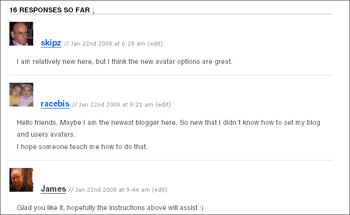
Basically, now whenever you leave a comment on another Edublogs blog your user avatar will show up, and likewise, when another Edublogs user comments on your blog, their avatar will show up, linking back to their blog. Neato huh!
Now, a byproduct is that if the people leaving comments who aren’t signed in edublogs users get an anonymous avatar… but that’s easily remedied by them grabbing a free account (they can get ‘Just a username’ or a blog if they want) and uploading an avatar. It’ll take them less than a minute and it’ll also mean they won’t have to fill in all the forms next time they leave a comment.
So, head to your ‘My Profile’ or ‘Users’ tab, click on ‘Your Profile’ and get uploading straight away… you could even leave a comment below to show it off :)


Can I have a different avatar for each blog, plus my user avatar? Whenever I change one of these, all my avatars seem to be set to the last option uploaded! :-(
Thanks for the Edublogger!!! After 2 years around, now I feel I can really start customising my blogs here!!!
Gladys
You certainly can… under ‘Options’ you can set your blog avatar and that will be different for each blog, however you only have one user login so that can only have one avatar if that makes any sense.
And yeh, Sue rocks out doesn’t she :)
Is there a way to turn this off on my class blog? Given all the security and privacy issues I would like to not have it as an option on my class blog. Thank you
Erm, what are the security and privacy issues that you’re referring to?
I’d weigh in on this one, too. Though my own school’s policy default allows me to display my students’ pictures unless specifically requested not to, the “easy button” factor of allowing anonymous comments, especially from my littlest ones, is negated by having it necessary for them to login to have their avatar display. Most of my kids don’t have email accounts for signup, given their ages (K-4th grade). The result is a comments page with all the avatar pics the bland and somewhat anonymous one. If there were some way to turn off the feature the page would look much more inviting.
We’ll see what we can do to make it a little more aesthetically appealing.
A little behind for the answer here but the security of a student not being found on the internet by people that should not be finding them. Even if the search engine blocker were to fail, and they were able to find the kid on the blog, (I have the students scramble their name just in case for the postings), I don’t want an outsider being able to identify them by photo. If perhaps just have a way to turn this option off for the individual blog would be a great fix in my opinion. I love this site, love what id offered and I am trying to talk my district into purchasing the upgrade. Thanks for all you do!!
Are there any suitable comic/cartoon avatars which we could use for fun, or could the kids draw a picture which could be scanned in and used as their avatar?
OK, we’ll have a look into a function for turning them off. Nice idea about having a link to some ‘stock’ avatars too!
You don’t have to use a face photo for an avatar. Last year I got my kids to choose an anonymous but unique photo to represent themselves – some used a photo of the back of their head, others their hand, or a foot, or a close up shot of one eye. All unique, but not identifiable.
This year I’m going to get them to draw a picture for their avatar, if I can ever get them to upload (mine won’t – I blame the wonders of dial-up internet!)
Yes that is a nice idea about the stock avatars, but that would require login, which I’m trying to avoid with my wee ones: maybe there’s a way anonymous comments could also choose from a handful of avatars? Just a notion. Thanks!!!
I can’t figure out how to put on my avatar. can some 1 tell me how??
There are several very good avatar creators online. Students can create an avatar to represent themselves. One that we use is http://www.moeruavatar.com/index_en.shtml
The Simpson’s Movie Avatar Maker is good too but there are also games on the website. http://www.simpsonsmovie.com/main.html
The Avatar Maker at http://www.buscarmessenger.com/avatars.swf is great. A screen shot and pasting into paint (or other editing program) is required.
I’ve uploaded my avatar, but it doesn’t appear when I make comments. It shows that I have both types, but nothing appears. What am I doing wrong?
Looks good to me :) (see above)
I have created an avatar but am having a hard time uploading it. Where do I paste the code? Andrea
Is it true that once you have created an avatar, you cannot change it or your edublog is put out of commission?
Erm, no.
I have to add my voice to the choirs that are asking for an option to turn OFF the avatars altogether. For privacy issues, I can’t put my kid’s images online.
Also, while I have your attention, every reply I get on my blog looks bad. Meaning, the text on the replies I’m getting on my blogposts show up on top of the avatar images (or lack thereof). Can anyone from Tech Support look at this and give me an idea as to how to fix the problem?
I’ll appreciate any help I can get! I have a couple of good comments going, and I’d hate to change the layout.
@jjortiz – We’ll look into it…. but it hasn’t exactly been a giant protest.
In the meantime you really have to provide us with examples of where you are having issues for us to be able to help.
Hello Bloggers,
Can anyone tell me how I can remove my blog avatar?
Options > Blog Avatar should do it.
I don’t have an avatar on my page yet, but I will get one soon. I use them on all of the other websites I visit. I remember when sites first started offering them. I like them because I don’t care to post pics all of the time and the avatar lets you have your own identity. I think you can find out a little bit about the person you are talking to when you see their avatar. It’s like a masked identity. I think they are hott!
I like the idea posted by culterprimaryschool about students drawing their own avatars that represent themselves. Once I get a move on with using my new blog with kids I’ll probably encourage this kind of avatar.
How do you get a personalized avatar with my photo instead of the coloured one given
Just go to Users > My avatar
It is a real thrill to have gotten my avatar up. I enjoy seeing everyone elses too.
I seem to be having a problem getting my avatar to load correctly. When I upload the photo it asks me to crop the portion of the photo I want. After doing so, I can’t seem to get it to accept this portion of the picture. There doesn’t seem to be a OK button or save/upload button at this point. I’m obviously missing something, but I can’t seem to figure out what it is. Any advice?
I am having the same problem as hodgsonw, I can’t get my avitar photo to load. I had to reset it to the defalut avitar…which I do not like. =o(
I love avatars. :D Yay avatars!